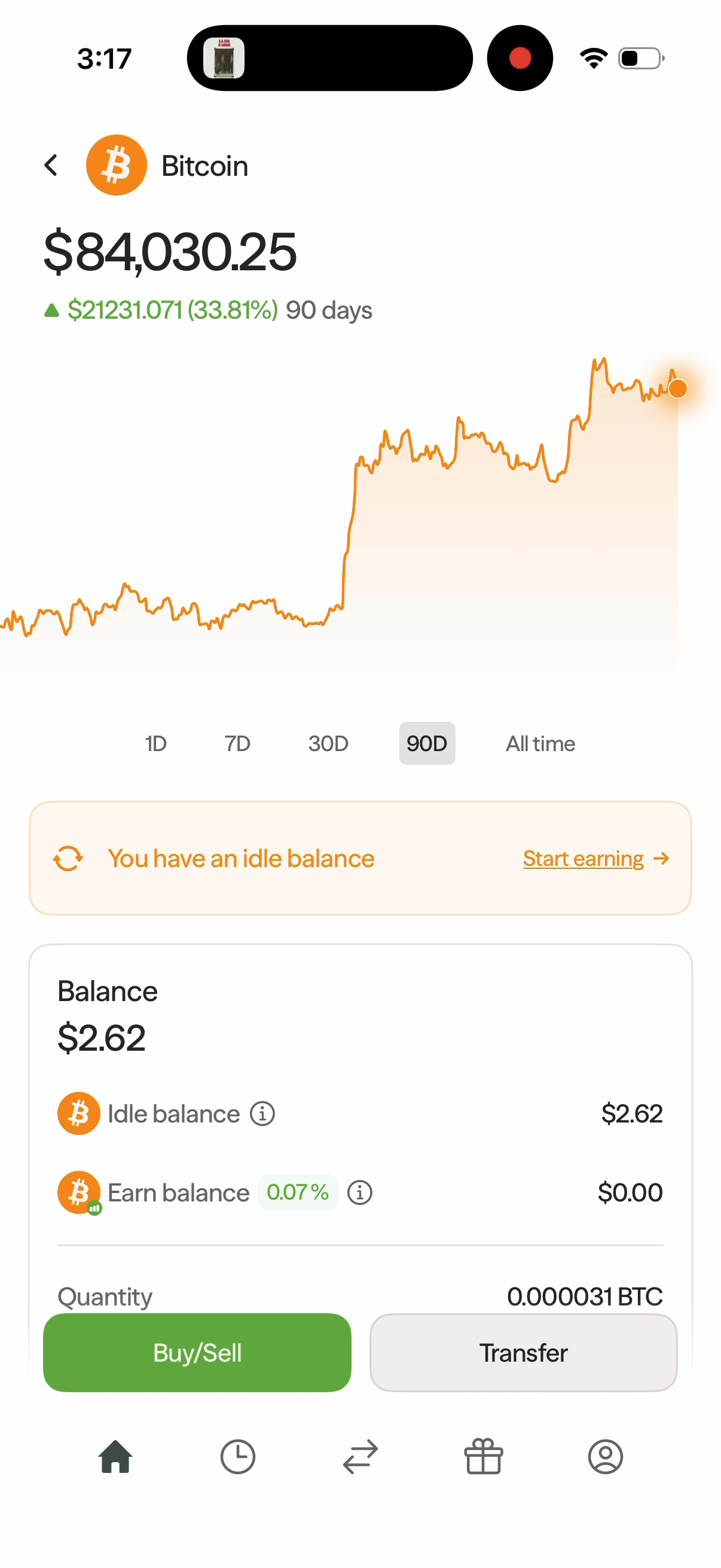
Open Bitcoin under Assets on the home screen to view its price, your balance, and your earnings.
Price and Balance
The chart at the top shows Bitcoin's price and its change over the selected period. Choose 1D, 7D, 30D, 90D, or All time to change the period.
Below the chart, the balance card shows:
- Balance — the dollar value of your Bitcoin holdings.
- Idle balance — Bitcoin that is not currently earning yield.
- Earn balance — Bitcoin allocated to earning yield, alongside its earning rate.
- Quantity — the amount of Bitcoin you hold, shown in BTC.
- Total return — your displayed return in dollars and as a percentage.
The Bitcoin price at the top of the screen is separate from the value of your own holdings in the balance card. Rates and values in the screenshot are examples; check the app for current values.
Start Earning
- Tap Start earning in the idle-balance banner, or tap Earn/Pause in the balance card and select Earn.
- Enter the dollar amount of Bitcoin you want to move into your Earn balance. Tap Use maximum to use the available Bitcoin balance shown on the screen.
- Tap Continue.
- On Review transaction, check the amount moving from Idle Balance to Earn Balance, along with the APY, fees, and processing time.
- Swipe up to earn to confirm.
- When Earnings initiated! appears, tap anywhere to continue. The confirmation says your amount will start earning shortly.
Return to the Bitcoin screen to see your updated Idle balance and Earn balance. The Earn/Pause control also provides a Pause option.
Track Your Earnings
Scroll to the Earnings card to see the amount earned This week and a daily bar chart. Tap All time on this card to open the detailed Earnings screen.
Under Axal Prime, you can review:
- Lifetime earnings — your total earnings for the strategy.
- Earning rate — the current rate.
- Asset — BTC.
- Earnings balance — the balance allocated to earning, displayed in dollars.
- Projected earnings — the displayed yearly estimate, which can change with your balance and earning rate.
Scroll down to the Earnings list to see daily earnings by date. Earn and Pause controls are also available at the bottom of this screen.
View Your Investments
On the detailed Earnings screen, Investments shows where the strategy distributes your assets. The allocation bar and investment list show the underlying markets, their allocation percentages, and rates. Each investment has a details arrow.
Learn About Bitcoin
Scroll down on the Bitcoin screen to Description and tap Read more to expand it. Below the description, you can open answers to these questions:
- Who controls my Bitcoin?
- How does Axal get me BTC?
- How does BTC yield work?
Use Buy/Sell or Transfer at the bottom of the Bitcoin screen to access those flows.
The lowest fees to buy Bitcoin
Buying Bitcoin anywhere else means paying exchange fees, spread markups, or conversion costs that eat into your position before you've earned a single satoshi. Axal offers some of the lowest all-in fees to purchase Bitcoin, so more of your money goes into BTC, not into someone else's pocket.
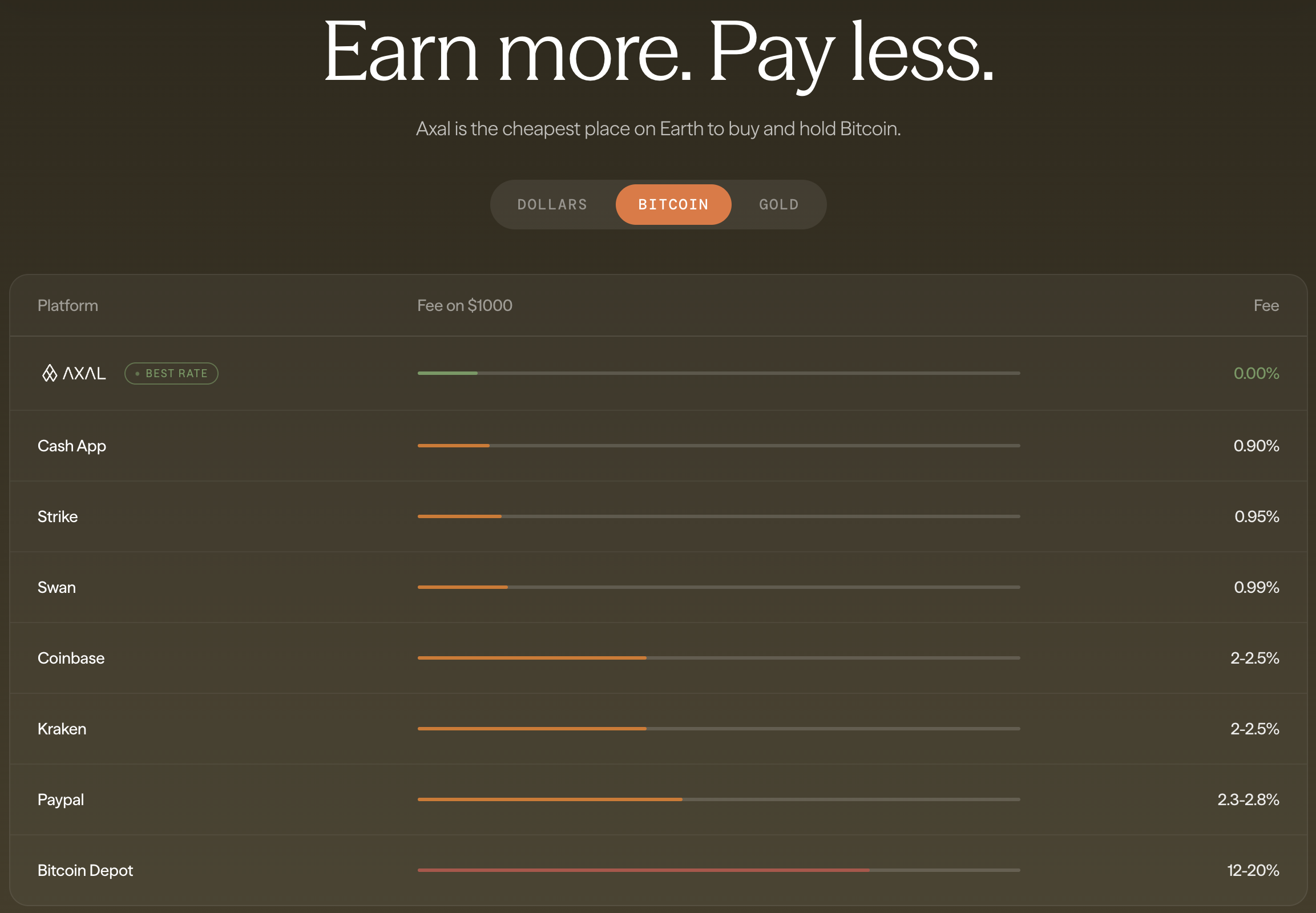
Traditional exchanges and brokerage apps typically charge 1–3% per transaction. Some platforms hide fees inside a spread, so you never see what you're actually paying. Axal keeps fees transparent and low, and once you hold BTC, your balance immediately becomes eligible to earn yield — something no exchange or ETF can offer.